December 2024
Release 24.5.2
Redeem Discretionary Comp
The Stay - Advanced Casino Systems Corporation (ACSC) integration is enhanced to allow users to redeem discretionary comp for patrons. Discretionary comps are provided to patrons by ACSC in discretion and the comp balance will not be known to users in advance.
When discretionary comp is redeemed for the folio charges, the discretionary balance of the patron will be validated in ACSC, and comp will be redeemed. Discretionary comps can be redeemed by both Admin Comp and Player Self Redeem comp type authorizers. Redeeming discretionary comp for a patron will not reduce the player comp balance of the patron in ACSC.
Contact Agilysys to enable the ACSC integration for the property.
To support this enhancement, a new option, Player Discretionary Comp, has been added to the Balance Type drop-down list in the Comp screen (Reservation ➜ Folios section ➜ More ➜ Comp).
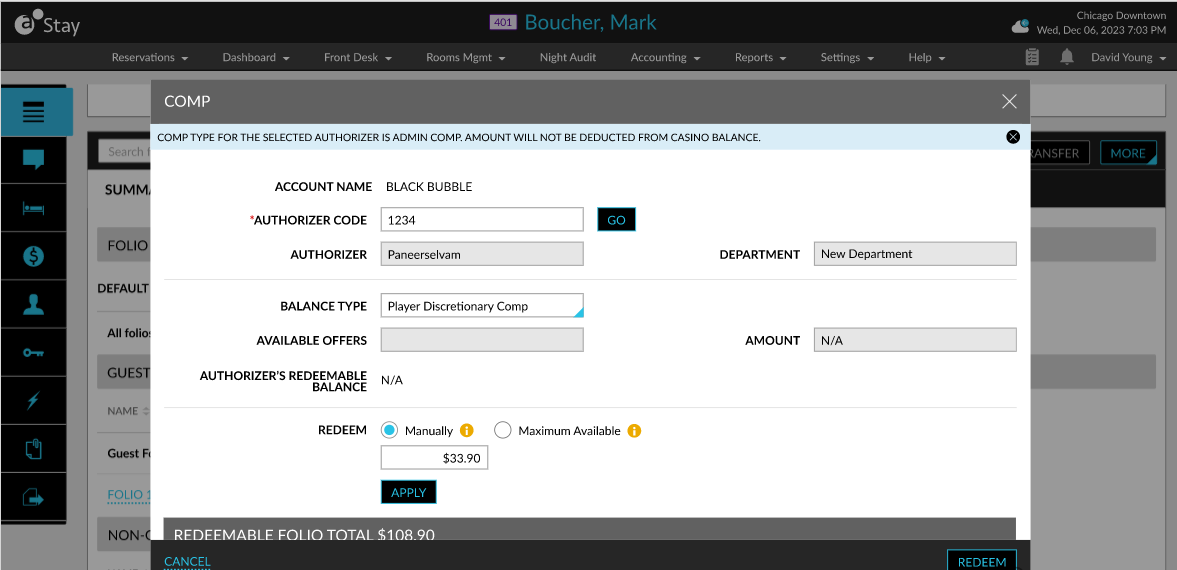
When users enter values for the fields, select the balance type as Player Discretionary Comp and click Redeem, the following details will be sent from Stay to ACSC and the comp authorizer and the discretionary amount available for the patron are validated.
-
Authorizer code
-
Player ID
-
Amount to be comped
-
Balance type
-
Reservation confirmation ID
-
Date and time when the reservation was created
-
Date and time when the comp is initiated in Stay
-
The check-in/check-out time of the reservation
-
Folio ID of the reservation (when multiple folios are present, the folio ID of the default folio will be sent)
Once the discretionary amount available for the patron is validated, selected charges will be comped successfully.
When the redemption amount is greater than or less than the discretionary amount available for the patron, a new pop-up screen, Override Reason, will be displayed. Users must select a reason for the override in the Override Reason drop-down list and click Redeem.
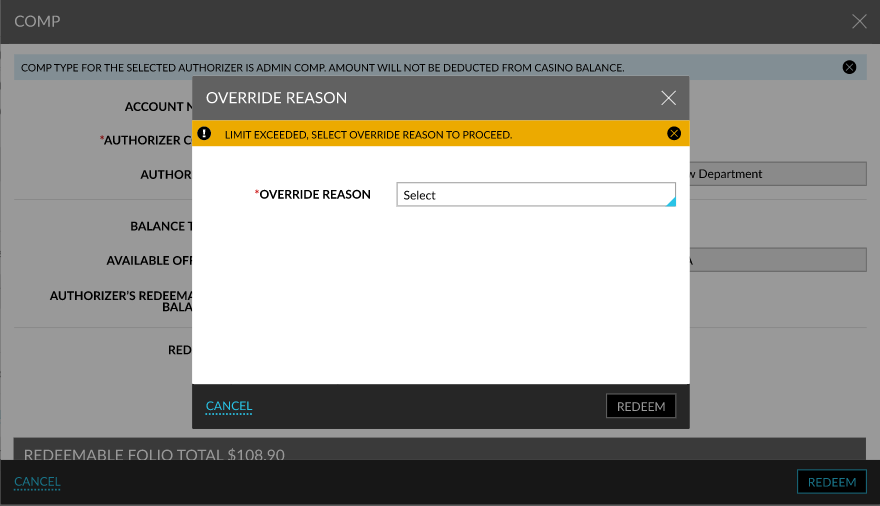
When users click Redeem, the override reason code will be sent to ACSC for validation and comp will be redeemed successfully upon successful validation.
When the override reason code is not validated successfully, the following message will be displayed in the Comp screen and comp will not be redeemed: Override reason/override authorizer is invalid or not part of the revenue center for the current slip.